Adapter Pattern
How Context Teleport bridges between its universal store format and tool-specific file layouts.
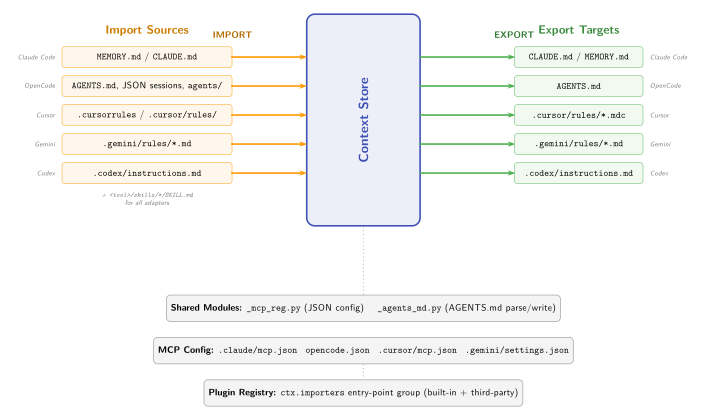
Overview
Each AI coding tool stores context differently:
| Tool | Format |
|---|---|
| Claude Code | MEMORY.md, CLAUDE.md, .claude/rules/*.md |
| OpenCode | AGENTS.md, JSON sessions, .opencode/agents/, .opencode/commands/ |
| Codex | AGENTS.md, .codex/instructions.md |
| Gemini | .gemini/rules/*.md, GEMINI.md |
| Cursor | .cursor/rules/*.mdc (MDC format), .cursorrules |
Adapters translate between these formats and the universal .context-teleport/ store. The flow is bidirectional:
- Import: read tool files, write to store
- Export: read from store, write to tool locations
Protocol
All adapters implement AdapterProtocol:
class AdapterProtocol(Protocol):
    name: str
    def detect(self) -> bool: ...
    def import_context(self, dry_run=False) -> dict: ...
    def export_context(self, dry_run=False) -> dict: ...
    def mcp_config_path(self) -> Path | None: ...
    def register_mcp(self, local=False) -> dict: ...
    def unregister_mcp(self) -> dict: ...
This is a @runtime_checkable protocol, not an abstract base class. Adapters don't inherit from a shared base -- they just implement the interface.
Import flow
Tool-specific files                  Context Store
==================                   ==============

MEMORY.md --------+
CLAUDE.md --------+--- import_context() ---> knowledge/*.md
.claude/rules/ ---+                          knowledge/.meta.json
                                             skills/*/SKILL.md
During import:
- The adapter reads all recognized files from the tool's locations
- Parses content into knowledge entries, decisions, and skills
- Writes to the context store via
ContextStoremethods - Each entry is attributed with
import:<tool>as the author
Import is additive -- it does not delete existing store entries.
Export flow
Context Store                        Tool-specific files
==============                       ==================

knowledge/*.md ----+
decisions/*.md ----+--- export_context() ---> CLAUDE.md (managed section)
skills/*/SKILL.md -+                          .claude/skills/*/SKILL.md
During export:
- The adapter reads all public-scope entries from the store
- Converts to the tool's native format
- Writes to the tool's expected locations
- For files that mix user and managed content (CLAUDE.md, AGENTS.md), only the managed section is touched
Managed sections
Export uses HTML comment markers to delimit managed content:
<!-- ctx:start -->
## Project Context (managed by Context Teleport)

### Architecture
We use hexagonal architecture with FastAPI.
<!-- ctx:end -->
The _agents_md.py shared module handles this pattern. Content outside the markers is preserved -- the adapter only replaces between ctx:start and ctx:end.
Shared modules
Two shared modules reduce duplication across adapters:
_mcp_reg.py -- MCP config registration
Handles JSON config file operations for tools that store MCP server configs in JSON (Claude Code, OpenCode, Cursor, Gemini).
- Reads existing config, creates if missing
- Adds or updates the server entry under
mcpServers - Sets
MCP_CALLERenv var for agent attribution - Supports
local=Trueto use local Python instead ofuvx
_agents_md.py -- AGENTS.md management
Handles parsing and writing AGENTS.md with managed sections. Used by OpenCode and Codex.
parse_agents_md(content)-- splits into managed and unmanaged sectionswrite_agents_md(managed_content, existing_content)-- replaces managed section, preserves rest
Skill handling
Skills use a cross-tool standard format (SKILL.md with YAML frontmatter). All adapters store skills in the same way:
For example: - .claude/skills/deploy-staging/SKILL.md - .gemini/skills/deploy-staging/SKILL.md - .cursor/skills/deploy-staging/SKILL.md
This means skills can be shared between tools by exporting from one and importing to another, or by syncing through the central store.
Adapter registry
The registry (src/ctx/adapters/registry.py) provides:
detect_adapters()-- runsdetect()on all adapters, returns those availableget_adapter(name)-- instantiates a specific adapter
Detection checks for tool-specific markers:
| Adapter | Detection criteria |
|---|---|
| Claude Code | .claude/ directory or CLAUDE.md |
| OpenCode | AGENTS.md or .opencode/ directory |
| Codex | AGENTS.md or .codex/ directory |
| Gemini | .gemini/ directory or GEMINI.md |
| Cursor | .cursor/ directory or .cursorrules |
MCP registration
Registration is the one-time setup that connects an agent tool to Context Teleport:
This writes the MCP server entry to the tool's config file:
{
  "mcpServers": {
    "context-teleport": {
      "command": "uvx",
      "args": ["context-teleport"],
      "type": "stdio",
      "env": { "MCP_CALLER": "mcp:claude-code" }
    }
  }
}
The MCP_CALLER environment variable is what enables agent attribution -- every write operation reads this variable to tag entries with the calling agent's identity.
Design decisions
Why protocols, not inheritance: Adapters have different internal structures (some manage JSON configs, some manage markdown files, some both). A protocol defines the contract without forcing shared state or method implementations.
Why managed sections: Users may have their own content in files like CLAUDE.md. Managed sections let Context Teleport update its portion without destroying user content.
Why uvx as default command: uvx resolves the package on demand, so users don't need to install context-teleport in every project's venv. The --local flag is available for development.